
If you think crypto mining is only for people with massive server rooms and $2,000 GPUs, I have a surprise for you. Today, I officially started my journey using a GTX 1660 (6GB).
While the “experts” might say this card is too old, I’m currently pulling in roughly 15,000 Nexa coins a day while staying at a freezing cold 52°C. Here is the exact blueprint of how I set it up, the Afterburner tuning I used, and the two major “bugs” I had to squash to get it working.
1. The Coin: Why I’m All-In on Nexa
In 2026, the mining landscape is crowded. I chose Nexa because it’s a Layer-1 blockchain built for massive scale (10 billion transactions a day!). Plus, with the first Nexa Halving coming up in June 2026, I wanted to stack as many coins as possible before the rewards get cut in half.
2. The Setup: MSI Afterburner Tuning
This is where the magic happens. The GTX 1660 is a “hidden gem” for the NexaPow algorithm because Nexa cares more about your GPU Core than your memory. By slowing down the memory, I saved power and kept the card cool.
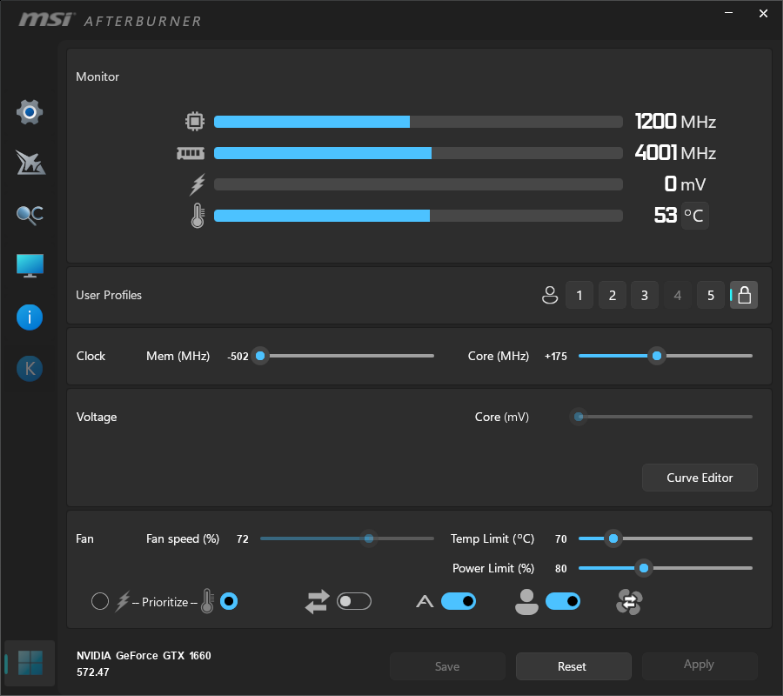
My “Sweet Spot” Settings:
Core Clock: +150 MHz (This is the “engine” that drives your hashrate).
Memory Clock: -502 MHz (Underclocking here saves power and reduces heat!).
Power Limit: 80% (Gives the card enough “juice” to boost without wasting electricity).
The Result: A stable 25.05 Mh/s at a rock-solid 53°C.
3. My Secret Weapon: unMineable
I use unMineable because it’s the easiest gateway for beginners. It lets you point your hardware at Nexa and get paid directly with zero hassle.
Pro Tip: You can actually lower your mining fees by using a referral code. Instead of the standard 1% fee, you only pay 0.75%.
Join my mining team here to get your 0.75% fee discount:
[https://www.unmineable.com/?ref=U-FP8WMW]
(Or use code: U-FP8WMW in your miner settings!)
4. Troubleshooting: The Two “Bosses” I Had to Defeat
I almost quit twice during this setup. If you are seeing 0 Mh/s or your speed keeps dropping, here is how I fixed it:
Bug #1: The “Zero Hashrate” Fix (Pagefile)
If your miner shows 0 Mh/s, your Windows isn’t giving the GPU enough “virtual” space to handle the Nexa algorithm.
The Fix: I went to Advanced System Settings > Performance > Virtual Memory and manually set my Pagefile to 16GB (16384 MB).
Note: You must restart your computer for this to take effect!
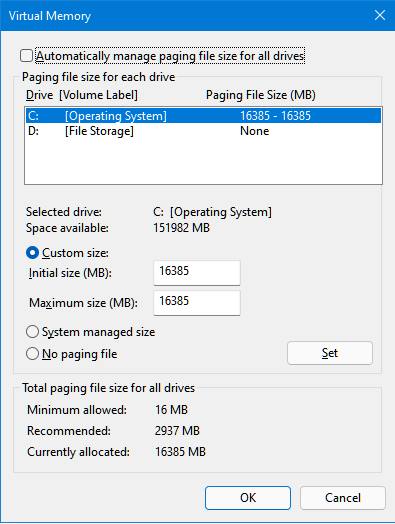
Bug #2: The 300 MHz “Power Trap”
Suddenly, my speed plummeted. My Core Clock was stuck at 300 MHz because the Nvidia driver “fell asleep” during mining.
The Fix: Open the NVIDIA Control Panel > Manage 3D Settings > Power Management Mode and select “Prefer Maximum Performance.” This forces the card to stay at full speed.
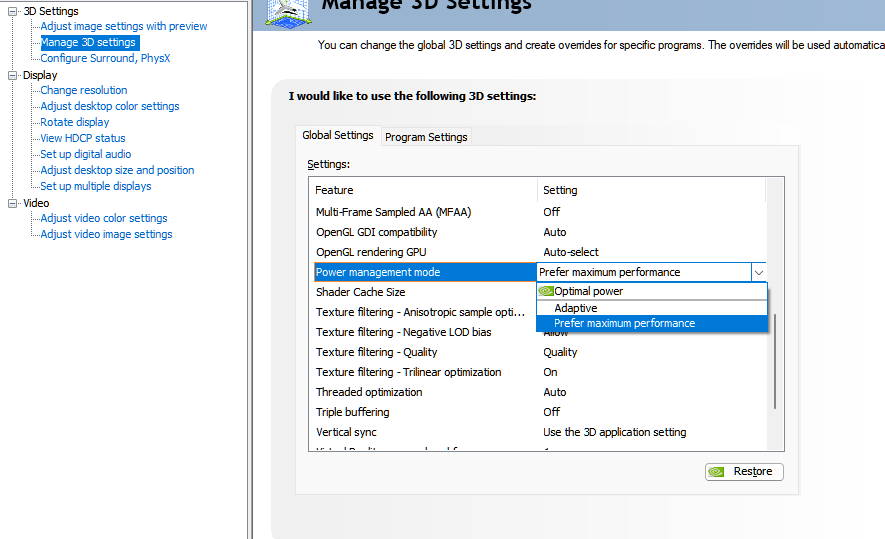
5. The Results
After just 15 minutes of stable mining, I hit 155 coins. Fast forward a little longer, and my balance is already over 466. At this rate, I’m looking at 10,000 to 11,000+ coins every single day.
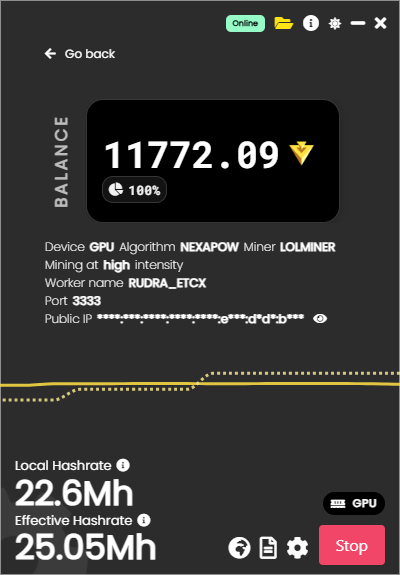
Final Verdict: Don’t let your old GPUs gather dust. With the right tuning and a little patience, you can still be a part of the decentralized future.
Are you ready to start stacking? Let me know your hashrate in the comments!